
Track token usage and manage AI spend across major AI platforms.
Ship before the limit hits.
Track subscriptions, token usage, and rate-limit pressure from one private Mac menu bar app.
Claude Code, Cursor, OpenAI, Copilot, Grok, and more — one local view.
macOS 14.6 Sonoma or later · Apple Silicon & Intel · ~10 MB download
- No login
- No cloud
- No tracking
- One-time Pro
Built in Germany · Private by design · Built for AI builders


From a menu bar glance to the full audit.
Six limits across Claude, Codex, and Grok in one panel. A projection that tells you when you will run out, not just that you are close. What the month would have cost at API rates, whether your plans earn their price, and a menu bar showing only the number you care about.
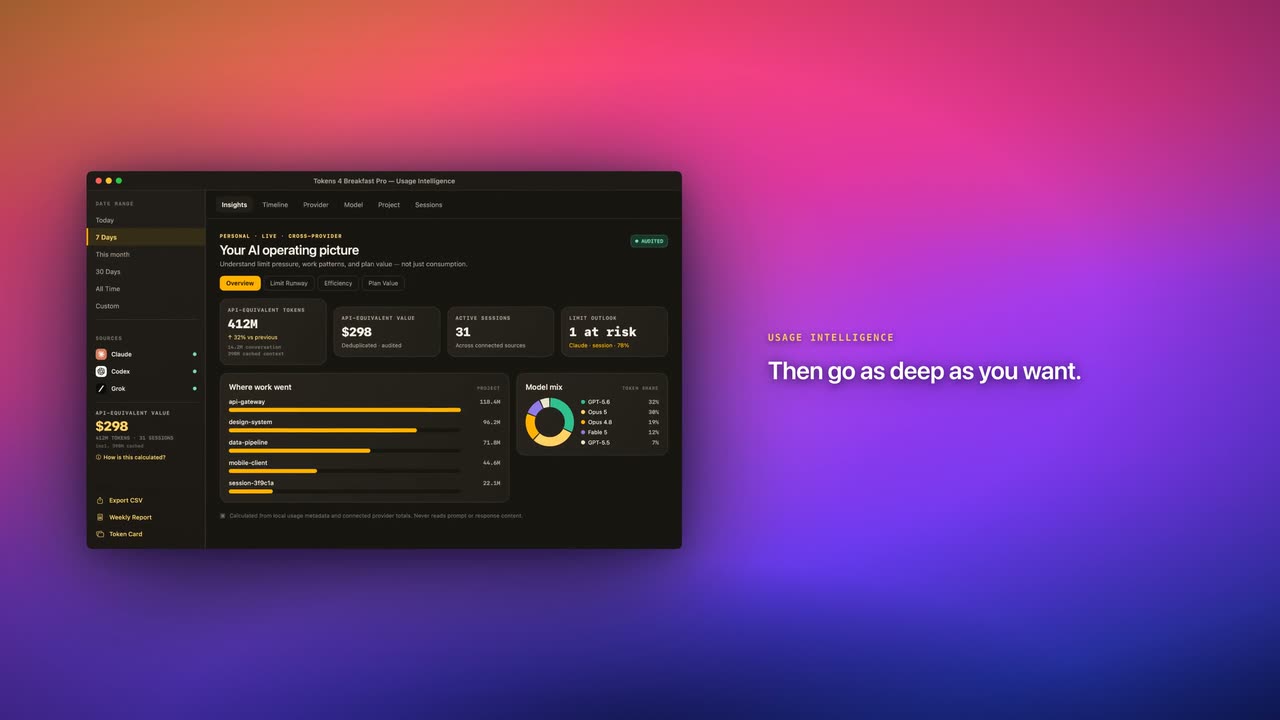
Four screens that make the price obvious.
Your whole AI stack, visible from one menu bar across the four views you actually check.
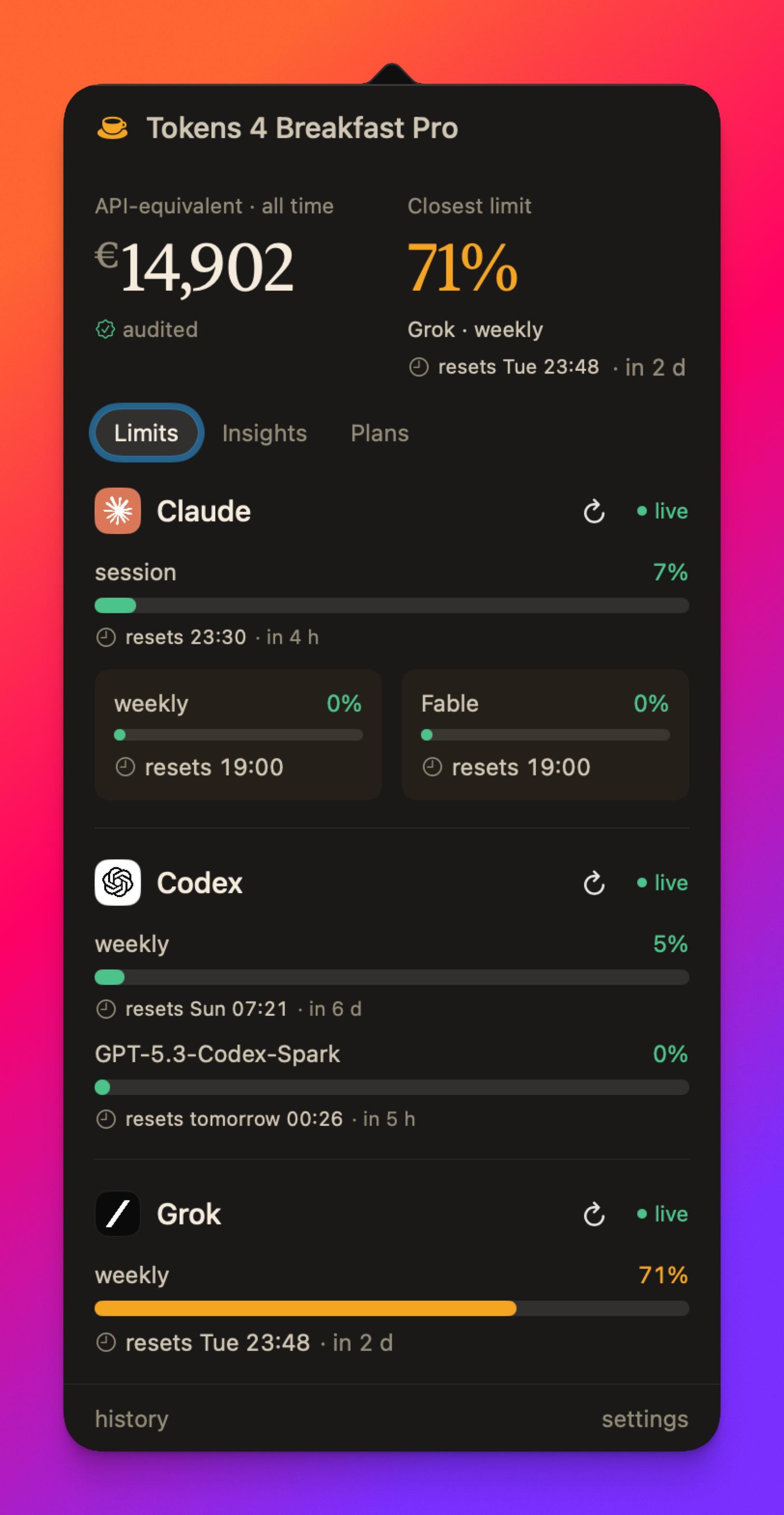
Live command center
One menu bar. Your whole AI bill.
Live Claude Web limits, your AI subscriptions, and a tap-through to Usage Intelligence all live in one calm popover. You see the real picture before another session quietly gets expensive.
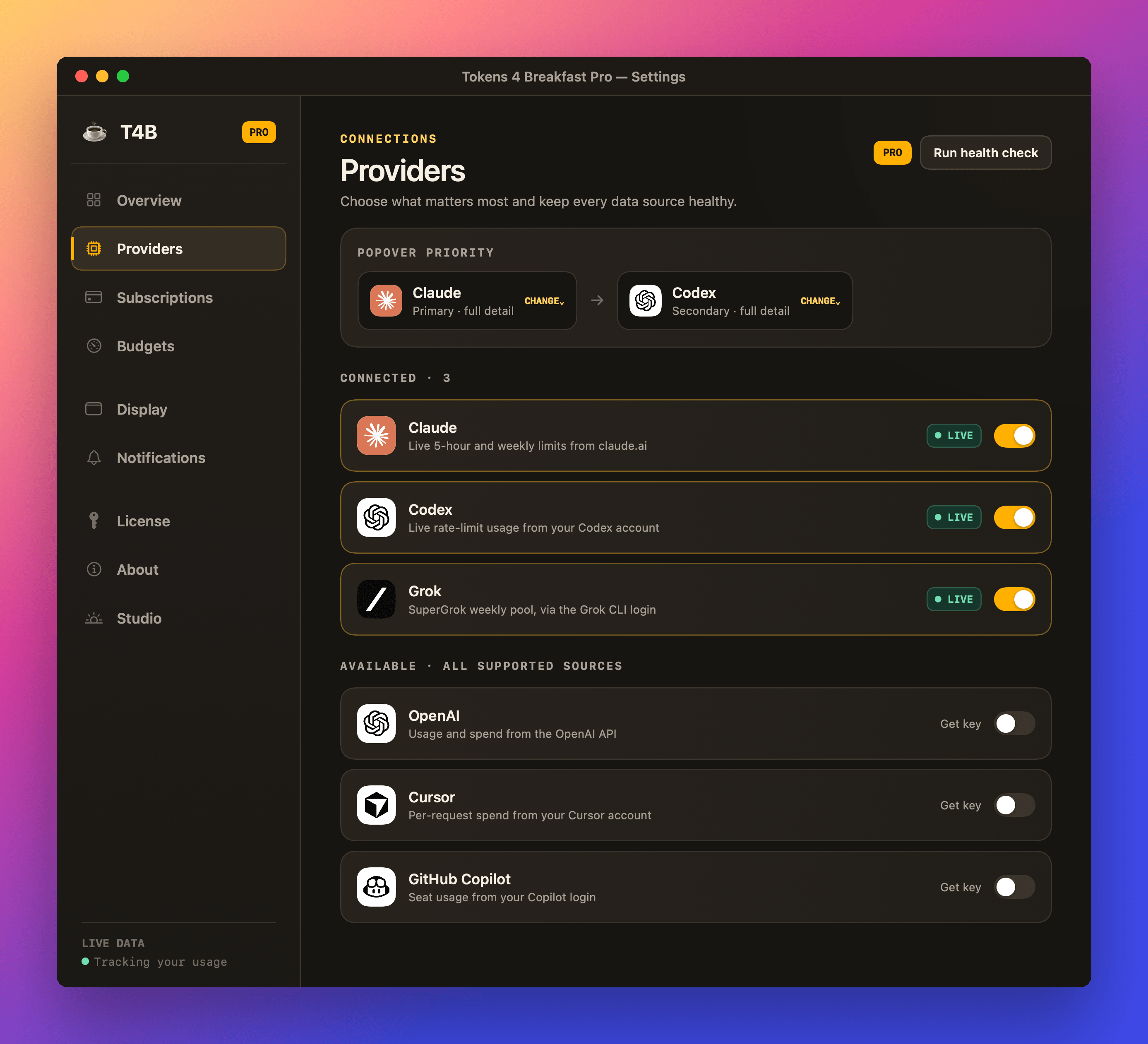
Provider coverage
All 11 providers in one source of truth.
Claude Web connects with live rate limits, Claude Code is auto-detected from your local files, and OpenAI, Cursor, Copilot, DeepSeek, and Mistral each take one key (Gemini: coming soon). No tab safari.
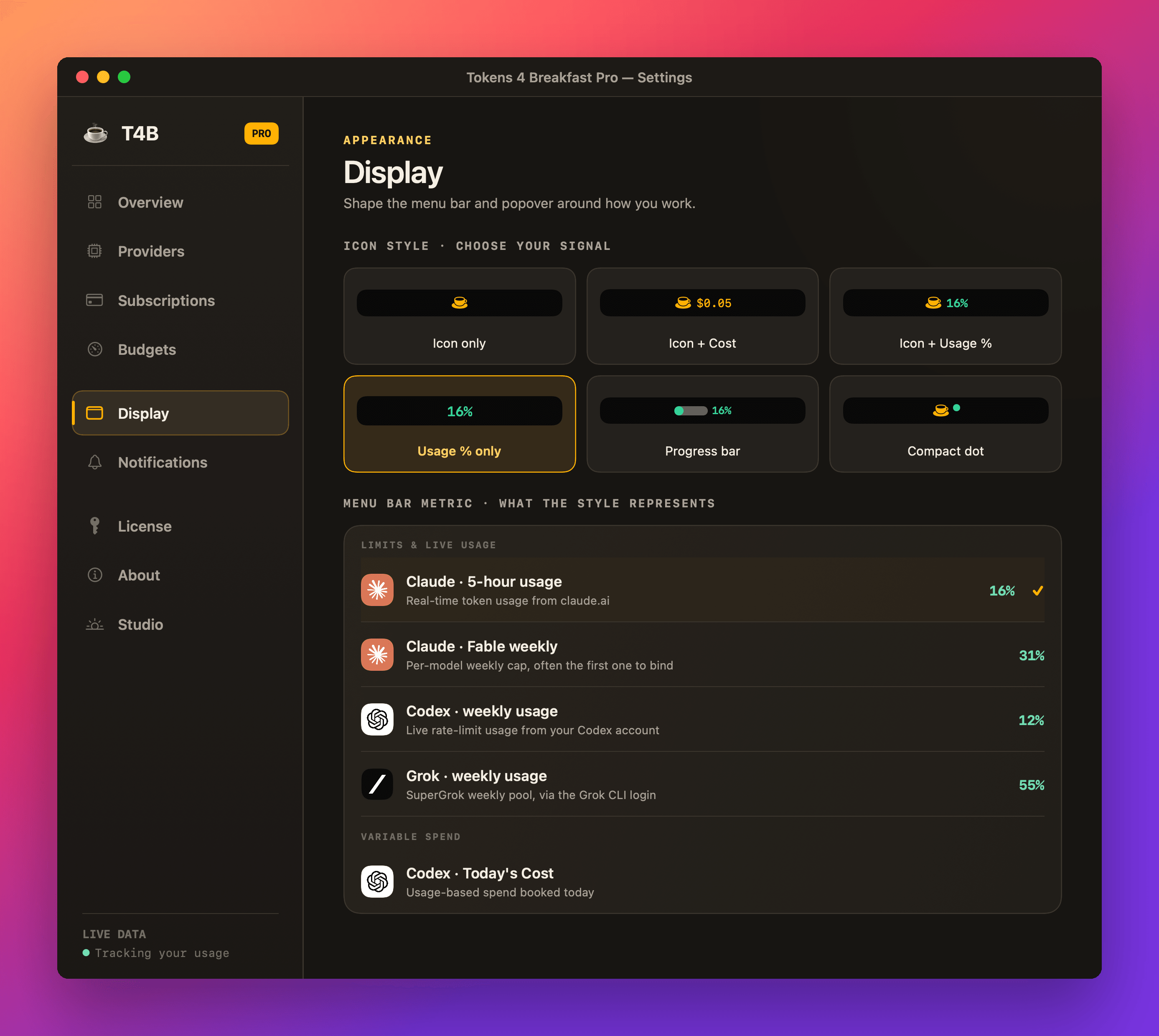
Menu bar control
Put the number that matters in the menu bar.
Show a live provider, all-provider spend, or subscription total. The signal stays visible in the format that matches how you actually work.
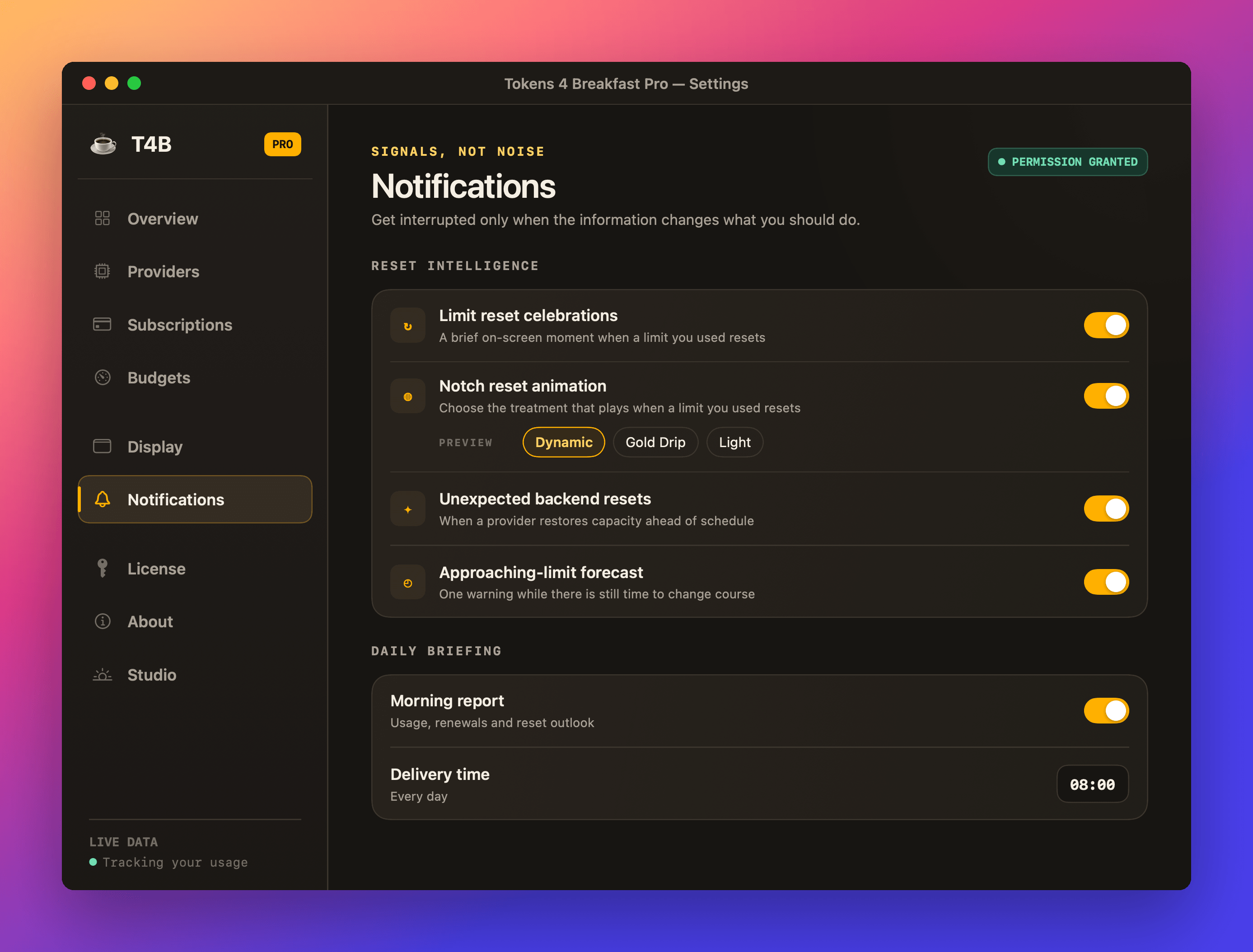
Morning digest + alerts
Get the warning before the bill gets weird.
Morning digests, rate-limit thresholds, and budget alerts surface the drift early. You wake up with the number already waiting.
Your notch just became a reset receipt.
Dynamic inflates the hardware notch itself into a full instrument panel — your provider's real logo, a complete 360° dial sweep, official per-event copy. It plays the moment a limit you used resets, even with the popover closed.

The features that make T4B different.
Eight product decisions make the app useful while you work, not after the damage is done.
Connect Claude in one tap
See your real Claude 5-hour and weekly limits live, read straight from the Claude Code login already on your Mac. No cookie, no session key, nothing to paste.
It stays private and local: the login is read and refreshed on your machine exactly like the Claude CLI does, and it never expires on you.
1 tap
Setup
See the wall before you hit it
Live burn-rate forecasts, a reset countdown, and per-model meters for Opus, Sonnet, and Fable warn you before you run out, not after you are locked out.
The menu-bar cup shifts from calm to amber to red as you approach a limit, and a heads-up fires when you are on pace to hit the cap, across Claude Code and claude.ai together.
5h
Claude window
Your usage, in real money
The headline number shows what your tokens would cost at live API rates — switchable across today, the last 7 days, or the last 30 days.
On a flat subscription it is the feel-good (or feel-the-burn) stat: “I'd have paid this much at API prices,” the number subscribers screenshot and share. Accurate to the token: counted from your local logs and deduplicated to match Claude's own usage.
$1000
Example 30-day value
Audited accuracy
The number you screenshot is the right one. Your Claude limits are read straight from Claude's own usage endpoint, and your spend is counted from your local logs, deduplicated to match Claude's own usage and self-healing if the logs ever change.
Most trackers drift from Claude's real numbers. T4B reconciles against them and shows unknown models as unknown, so the figure is verifiable against Claude's own data.
100%
Outbound calls logged
Cross-provider limit runway
Not “78% used”. How long the window lasts at the rate you are actually burning it.
Every tracker shows a percentage. Limit Runway turns your current velocity into time remaining, across all your providers at once, so you find out before an agent run stops mid-task.
6
Limit windows watched live
Zero-setup onboarding
Claude Code and GitHub Copilot connect from local config. Cursor, OpenAI, DeepSeek, Mistral, and OpenRouter take one key (Gemini: coming soon).
This is built for builders in the middle of work, not for people who want another configuration project.
2 min
Typical setup
Session budget / Focus Mode
Set a spend cap before you start, then get warned before you drift past it.
The point is to stop the accidental runaway agent run while the session is still open in front of you.
$5
Common cap
AI Subscription Tracking
Track what you pay for Claude Pro, ChatGPT Plus, Cursor, and every other AI subscription in one place.
See your total monthly AI bill — API costs AND subscriptions combined — before it surprises you.
€132
Typical monthly sub total
And everything else the app does, at a glance.
Flex your token bill.
People track calories. You track how much your second brain costs you. Turn your usage into a shareable Token Card — sized for the platform you are posting to, with the number you choose to lead with.
Lead with whichever number is yours
All tokens, just the conversation, or the dollars. Whichever you pick, the card still names the other figure, so nothing on it can be read the wrong way.
Shaped for where you post it
Square, 4:5 for Instagram and Threads, 9:16 for Stories, 16:9 for an X timeline — each exported at that platform's own pixel size, so nothing is rescaled on upload.
Numbers you can stand behind
The model split shows your true shares with the remainder stated, and the figure reconciles with the spend beside it. Audited, on the card itself.
One price. No subscription. Yours forever.
Start free with the live meter. Upgrade once the forecasting, budget guardrails, and cross-provider visibility start saving real money.
Rate Limit Forecasting
Know you'll hit your limit 2 hours before it happens. Not after.
11 Providers, One Dashboard
Claude Code, Claude Web, Cursor, Codex, Copilot, Grok and more — aggregated in real time.
Plan Value, Measured
See what your month would have cost at API rates — and whether your plan earns its price.
Free
$0
Forever
A clean funnel, not a crippled trial.
Pick one provider, keep the live cost visible, and decide later if you need the forecasting and control layer.
- 1 provider of your choice
- Live menu bar spend display
- Today / 7-day history
- Claude Code 5-hour window timer
- Limit reset alerts the moment your window rolls over
- AI subscription tracker — Claude Pro, ChatGPT Plus, Cursor & more
- Privacy Audit Log
- Audited accuracy — spend verifiable against Claude's own numbers
- Multi-currency support
No account required · One provider of your choice · Multi-currency ready
Pro
$14.99
One-time, no subscription ever
Less than two cups of coffee. Pay once, use forever.
Everything in Free, plus the full control layer.
All 11 providers, budget alerts, and exports — the whole picture in one menu bar.
- All 11 providers in one view — Claude Code, Claude Web, Cursor, Codex, Copilot, Grok & more (Gemini: coming soon)
- 30-day history & Sessions tab with cost breakdown
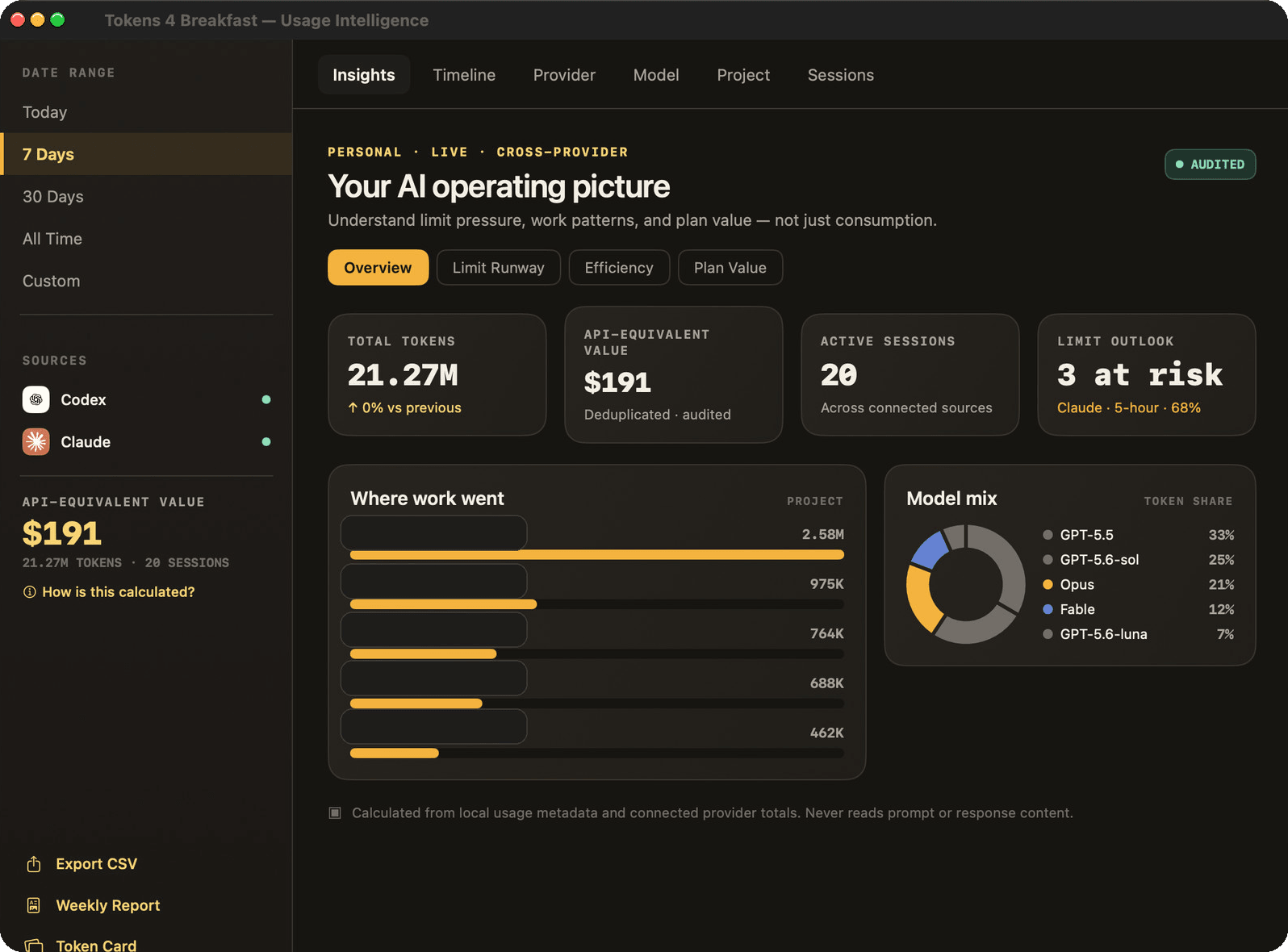
- Usage Intelligence — Limit Runway, Efficiency tips, and where every token goes
- Plan Value — see whether your plan is worth it versus API rates
- Velocity-based rate-limit forecasting
- Per-provider daily & weekly budget alerts
- CSV export & priority support
One-time payment · macOS 14.6 Sonoma or later · Apple Silicon & Intel · 14-day refund guarantee
T4B users find $47/month they forgot was running — on day one.
That is the first moment where the app pays for itself: you catch the drift before it becomes another month of background spend.
No more mid-task interruptions
You know exactly how much runway you have before Claude cuts out. No surprises at minute 47 of a long agent run.
No more end-of-month bill panic
Yesterday, the last 7 days and the last 30 sit side by side, with subscriptions counted in. You watch the total build instead of meeting it on an invoice.
No more context-switching
The number lives in your menu bar. You never have to open a dashboard, check a browser tab, or log in to anything.
Works with
Works with every AI tool you already use.
11 providers. One menu bar. Zero tab switching.

Claude Code
Anthropic
Claude Web
claude.ai · limits

Codex
OpenAI

Cursor
Anysphere

GitHub Copilot
GitHub
OpenAI
OpenAI
Anthropic API
Anthropic

Grok
xAI · limits

Gemini
Google · coming soon

DeepSeek
DeepSeek

Mistral
Mistral AI

OpenRouter
OpenRouter
Every high-intent path now points to the right tracker.
Searchers do not all start with the brand. Some look for Claude Code limits, Cursor spend, OpenAI API cost, or a local AI budget tracker. This hub gets each one to the right page in one click.
Compare before you choose
Bottom-funnel pages for people already comparing tools.
The alternatives solve parts of the problem. This one stays open while you work.
Single-provider trackers show you a number. T4B shows you what that number means — across every AI tool you use.
Single-provider trackers
ClaudeMeter, SessionWatcher, etc.
T4B
Tokens 4 Breakfast
Free + $14.99 Pro
T4B
Free + $14.99 Pro
Compare with alternatives ↓ClaudeMeter, SessionWatcher, etc.
Live menu bar tracking
Claude 5-hour window countdown
100% local, no cloud
One-time price
11 providers in one app
Cross-provider spend total
Rate limit forecasting
Cross-provider limit runway
Budget alerts & caps
Plan optimization recommendations
Subscription cost tracker
Privacy Audit Log
The real gap
The baseline trackers are useful. The exclusive rows are where T4B turns a single-provider meter into a cross-provider command center.
11 providers in one app
Cross-provider spend total
Rate limit forecasting
Cross-provider limit runway
Budget alerts & caps
Plan optimization recommendations
Subscription cost tracker
Privacy Audit Log
Know before you're blocked.
T4B tracks your Claude usage velocity every 5 minutes and projects when you'll hit your 5-hour or weekly limit. You get a heads-up with hours to spare — not after the limit cuts your session.
Budget this task, not your whole month.
Set a $1, $2, or $5 budget for the next hour of work. T4B alerts you at 80% and again at 100% in real time. Perfect for keeping API-billed work sessions under control.
One bill. Eleven tools. Full picture.
Single-provider trackers give you one number. T4B aggregates Claude, OpenAI, Cursor, Copilot, Grok, and six more into a single dashboard with 7-day history free and 30 days on Pro.
Most people are fully set up in under two minutes.
The setup flow is short on purpose. Download the app, connect what you use, and let the spend signal stay in the menu bar while you work.
Download
Click the button. Open the .zip. Drag to Applications.
Connect
Pick your provider in Settings. Six connect with nothing to paste, from credentials already on your Mac: Claude Code, Claude Web, Cursor, Codex, GitHub Copilot, and Grok. DeepSeek and OpenRouter take a personal API key. OpenAI, Anthropic API, and Mistral need an organisation admin key — a personal key cannot read the usage endpoint. Gemini is catalogued but not yet collecting. Free plan: 1 provider. Pro: all 11.
Watch
Your live spend appears in the menu bar. That's it.
From developers who stopped guessing
These are the moments the app is built for: switching models sooner, catching runaway sessions earlier, and seeing all provider spend in one place.
“
I didn't realize I was burning $60/month on Claude Opus for tasks Sonnet handles just fine. Found it on day one.
Alex M., indie developer
“
The Focus Mode session budget is the only thing that's stopped me from accidentally running a runaway agent loop while I grab coffee.
Priya K., full-stack engineer
“
I track 4 providers: Claude, OpenAI, Cursor, and Copilot. This is the only app that shows them all in one place.
James T., AI tooling builder
Privacy
Your data never leaves your Mac.
Tokens 4 Breakfast does not need a cloud backend, an account, or a telemetry pipeline. Your usage data stays in a local SQLite database on your machine, so your history and local tracking keep working even when you are offline — only live limits and provider refresh need a connection.
German-built, local-first software for people who want the spend signal without turning their usage data into someone else's dataset.
Everything stays on your Mac. No account. No cloud. No subscription — ever.
✅
Built in Germany
🔒
Local SQLite only
🚫
No accounts
📡
No telemetry
✅
History works offline
Questions buyers ask before they install.
Quick answers on what T4B tracks, how privacy works, and where the free plan stops.
What is Tokens 4 Breakfast?
Tokens 4 Breakfast (T4B) is a native macOS menu bar app that tracks your AI usage, costs, and rate limits across multiple providers in one unified dashboard. Instead of checking Claude's settings page, then OpenAI's billing page, then Cursor's dashboard separately, T4B aggregates everything into a single live view that's always one click away. It also forecasts when you'll hit rate limits, tracks spending trends over time, and lets you set budget caps with alerts so you never get surprised by a bill.
Where is Tokens 4 Breakfast built?
Tokens 4 Breakfast is built in Germany with a local-first privacy model: no account, no telemetry, and usage data stored on your Mac.
What providers are supported?
T4B connects 11 providers: Claude Code, Claude Web, Cursor, Codex, GitHub Copilot, Anthropic API, OpenAI, Grok, DeepSeek, Mistral, and OpenRouter. 8 of them report real spend; Claude Web and Grok report live rate-limit windows only, and DeepSeek reports account balance — there is no dollar figure to show for those three, so the app does not invent one. Claude Code reads local session files, GitHub Copilot and Codex use your local CLI credentials, and Claude Web uses your browser session cookie for 5-hour and weekly limits — none of those need a key. Gemini is catalogued but not yet collecting. The free plan includes 1 provider; Pro unlocks all 11.
What is Focus Mode?
Focus Mode lets you set a dollar budget for a specific work session. Hit Start, pick a budget ($1, $2, $5, or custom), and T4B monitors your real-time spend across all connected providers. You'll get a notification at 80% of your budget and again when you hit 100%. It's useful when you want to timebox AI-assisted tasks without accidentally running up a large bill, especially when using API-billed providers like OpenAI or DeepSeek.
Does the app read my conversations or prompts?
No, and this is not a vague assurance. Here is exactly what happens in the code: when T4B ingests Claude Code session files, it keeps only the `usage` metadata (token counts, model name, timestamp, cost). Records are processed in memory to extract that metadata and then discarded — your prompts and AI responses are never stored anywhere and never transmitted anywhere. The same applies to every other provider: T4B calls their official usage/billing API endpoints, which return aggregate token counts and costs, never conversation content.
Is there a free plan?
Yes. The free plan lets you connect 1 provider and includes the full menu bar dashboard, 7-day spending chart, Focus Mode session budgets, AI subscription tracking, and the Privacy Audit Log. It's fully functional with no time limit and no account creation required. If you only use Claude Code and want to track your token usage and costs, the free plan covers that completely.
Does it work with Claude Code without an API key?
Yes. T4B reads Claude Code's local session files (JSONL format in `~/.claude/projects/`) directly on your Mac. No API key, no network call, no configuration beyond enabling the provider toggle. If you use Claude Code, T4B will automatically detect and parse your sessions.
 01 / Context signal
A companion for AI-heavy work
Measure the session. Build the context first.
Tokens 4 Breakfast keeps usage, spend, subscriptions, and rate-limit pressure visible. Clip 4 Breakfast prepares the ordered, reviewable context you send into the session — without moving clipboard history to a cloud account.
Native macOS app · Local-only clipboard history · Free tier available